What Is a SaaS Onboarding Checklist? A Step-by-Step Guide for 2026
What Is a SaaS Onboarding Checklist? A Step-by-Step Guide for 2026
What Is a SaaS Onboarding Checklist? A Step-by-Step Guide for 2026
/
8 mins read
TL;DR. A SaaS onboarding checklist is the ordered list of steps that takes a new user from signup to the first aha moment. This customer onboarding checklist has 12 steps in six stages. Use the free interactive checklist below, adapt your onboarding process to your product, keep the in-app part to 3 to 5 tasks, and measure activation rather than completion.
Where can you get a free SaaS onboarding checklist template?
You can use the free SaaS onboarding checklist template below. It contains the 12 steps of this guide, grouped by stage, with the goal, an owner and a success metric for each step. Tick the steps as you go, then copy the list, download it as a .txt or .csv file, or print it as a PDF to adapt it to your onboarding program.
What does the SaaS onboarding checklist template contain?
The template covers the full customer onboarding process, from signup to review.
The 12-step checklist: every step of this guide, grouped into six stages, with the goal of each step, its owner and the metric to watch.
A progress bar: tick each step as you complete it; your progress is saved in your browser so you can come back to it.
Export options: copy the checklist to paste it into your project tool, download it as a .txt or .csv file to add owners and due dates, or print it as a PDF.
How do you use the template in five steps?
Work through the template from top to bottom, then review it with your team every week for the first month.
Write your activation event before anything else, and the core action behind it (step 1).
Skip the steps that do not apply. A self-serve product with no sales team can leave steps 10 and 11 unticked.
Export the .csv and assign an owner and a date to each remaining step, so no task is left to chance.
Build the in-app part with three to five tasks worded as outcomes (step 6).
Track the metric of each step every week and fix the step where most users drop off.
Who is the SaaS onboarding checklist template for?
The template suits product managers, growth teams and customer success teams at any SaaS company, from a startup launching a first free trial to a B2B vendor with a dedicated onboarding team. Self-serve products focus on stages 1 to 4; B2B teams add the kickoff and handoff steps of stage 5.
What should be included in a SaaS onboarding checklist?
A SaaS onboarding checklist should include a defined activation event, a short signup, a welcome message, a fast first key action, an in-app checklist of 3 to 5 tasks, behavior-based follow-ups, and metrics to track. For B2B accounts, add a kickoff and a sales-to-CS handoff.
Here is the full checklist. Copy it, or use the interactive template above, then remove what does not apply to your product.
# | Step | Goal | Owner | Metric to watch |
|---|---|---|---|---|
1 | Define the activation event | Agree on the action that proves a user got value | Product + CS | Activation rate |
2 | Keep signup short | Remove everything that is not needed to start | Product / Growth | Signup completion rate |
3 | Ask 1 to 3 welcome-survey questions | Learn the user's role and goal to segment them | Growth | Survey completion, split by segment |
4 | Send a welcome message (email and in-app) | Bring the user back to the product with one clear next step | Lifecycle marketing | Signup to first login |
5 | Get the user to the first key action fast | Reach a first win before any tour | Product | Time to first key action |
6 | Add an in-app checklist of 3 to 5 tasks | Show the path to activation and the progress made | Product | Checklist completion rate |
7 | Guide users in context | Help at the exact step where they get stuck (product tour, hints, assistant) | Product | Drop-off per step |
8 | Invite teammates and connect integrations | Set up the workspace so the product sticks inside the account | Product / CS | Seats invited, integrations connected |
9 | Follow up on behavior | Re-engage users who stall, congratulate those who progress | Lifecycle marketing | Share of stalled users who resume |
10 | Run a kickoff and agree a success plan (B2B) | Align on goals, owners and dates | CS | Time from signature to kickoff |
11 | Hand off from sales to CS (B2B) | Transfer what was promised and who the stakeholders are | Sales + CS | Handoff completeness |
12 | Measure and iterate | Find the step where users leave and fix it | Product + CS | Activation, time to value, 30-day retention |
Steps 1 and 12 are the ones teams skip. Without an agreed activation event, nothing else can be measured, and without a review loop the checklist goes stale after the next release.
What are the 12 steps of a SaaS onboarding checklist grouped by stage?
The 12 steps fall into six stages. Each stage has one question to answer before you move on.
Before and during signup (steps 1-3): do we know what "activated" means, and can a user start in under a minute?
Welcome (step 4): does the user know the one thing to do next?
First value (steps 5-6): can the user reach a first win without reading anything?
Adoption (steps 7-9): does the user come back and use more than one feature?
B2B handoff (steps 10-11): does the customer team know who owns what?
Measurement (step 12): do we know where users drop off, and why?
What is a SaaS onboarding checklist, and what is it for?
A SaaS onboarding checklist is a structured list of tasks that guides a new customer to the point where they get value from your product. It serves two purposes: it keeps your own team consistent, and, as an in-app version, it shows the user what to do next and how far along they are. A structured onboarding also helps users feel supported from the first session.
The word "checklist" covers two different things:
The internal onboarding checklist is the plan your team follows: who sends what, when, and who owns each step. This article covers it in full.
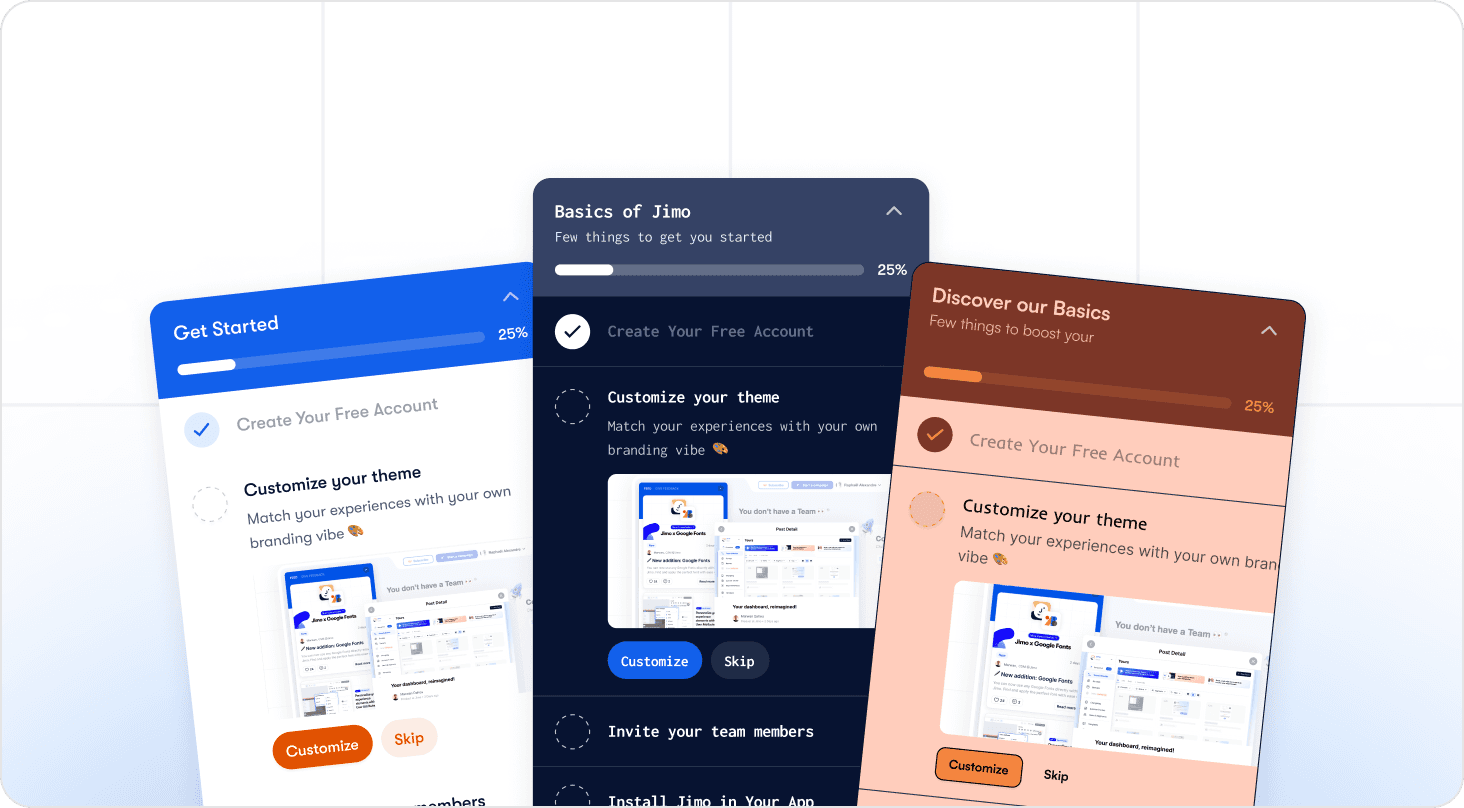
The in-app onboarding checklist is the progress widget the user sees, with a few tasks and a completion bar. It is one step of the internal checklist (step 6). For a deeper guide to building one, see our guide to the user onboarding checklist.
Why does a checklist help users finish onboarding?
A visible list of tasks gives users a clear next step and shows progress. People tend to remember and want to finish tasks they have started, a pattern known as the Zeigarnik effect. A checklist turns that tendency into action: the user who completes the first task is more likely to complete the second, which lifts user engagement early.
Is checklist completion the same as activation?
No. Completion means the user ticked the boxes; activation means they did the thing that proves they got value. A user can finish a checklist made of easy tasks and still never reach your activation event. Judge the checklist on how many users activate, not on how many finish it. High completion rates alone are not a success metric. See the metrics section below.
What is the onboarding process for a SaaS product, stage by stage?
The SaaS onboarding process has six stages: signup, welcome, first value, adoption, B2B handoff, and measurement. Self-serve products run mostly stages 1 to 4 in the product; B2B products add people-led steps in stage 5. Together they form the onboarding journey from first visit to a user who sticks, and the onboarding flow the user actually sees is the in-product part of that journey. This is the core of SaaS customer onboarding.
What happens before and during signup?
Before signup you define the activation event and keep the form short. Ask only for what you need to create the account, and move the rest into the product.
Write down the activation event in one sentence, for example "created and shared a first report".
Remove optional fields from the signup form to cut friction.
Ask one to three questions after signup (role, goal, team size) so you can segment users from the first session. A short welcome survey is also the first chance to gather feedback on why the user came.
What should the welcome step include?
The welcome step should include a welcome message that names one next action. Send it by email and show it in the product, so a user who closes the tab still has a reason to return.
One clear call to action, not a list of five.
A line that tells the user how long the first task takes.
A link to help, not a long manual.
How do you guide users to their first key action?
Put the first key action in front of the user before any tour. The faster a user completes something real, the less guidance they need afterward. This is how you reach the aha moment early.
Pre-load sample data if an empty screen would block the first action.
Name the checklist tasks after outcomes ("Send your first invoice"), not setup chores ("Configure settings").
Keep guidance in context: a hint on the exact button, or a short interactive walkthrough, not a tour of the whole interface. See product tour examples for patterns that work.
How do you drive feature adoption after activation?
After activation, introduce the second and third features when the user's behavior shows they are ready. Trigger messages from what the user did or did not do, rather than from a fixed calendar. This is how you turn first use into lasting product adoption.
Congratulate the user on reaching the activation event and suggest one related feature.
Nudge users who stop at a step for several days.
Keep help available in a resource center and a knowledge base so users find answers without contacting customer support.
Should the checklist include billing and payment setup?
Put billing and payment setup after the first win, not before it. In a free trial, asking for payment details before the user has seen value adds friction and lowers the trial-to-paid rate. Place the pricing and upgrade step once the user has reached the activation event, and make the next step clear: plan choice, billing contact, then payment.
For a free trial, show the upgrade path in the last third of the trial, tied to the features the user actually used.
For paid-from-day-one products, collect payment at signup but keep the first task free of setup.
What changes for B2B and multi-seat accounts?
For B2B accounts, onboarding adds people-led steps: a kickoff meeting, a success plan, role-based setup and a clean handoff from sales to customer success. The product checklist is still there, but several people now need to complete it, and complex setups need an owner on each side.
Kickoff: confirm the goal, the stakeholders and the date of the first milestone.
Roles: an admin sets up integrations and permissions; end users need a shorter path to their first task.
Handoff from sales to CS: write down what was promised, who the champion is, which integrations are required and any deadline the customer mentioned.
How long B2B onboarding takes depends on the number of integrations and stakeholders. There is no reliable universal figure; take the median from your last ten accounts and use it as your baseline.
Should you choose high-touch or low-touch onboarding?
Choose low-touch onboarding when users can reach value alone with in-product guidance, and high-touch onboarding when setup is complex or the contract value justifies a dedicated person. Many SaaS companies mix both: a low-touch path for small accounts and a high-touch path, led by the success team, for large ones.
Low-touch | High-touch | |
|---|---|---|
Who leads | The product (checklist, tours, emails) | The onboarding team or a customer success manager |
Best for | Self-serve, short setup, many small accounts | Complex setup, integrations, large contracts |
Main risk | Users who stall and never ask for help | Cost per account, and a process that does not scale |
How do you measure and iterate?
Measure where users leave, then change one thing at a time. Compare each cohort to the one before it, and schedule regular reviews of the checklist after every significant product release. The metrics themselves are covered in the measurement section below.
How do you create a SaaS onboarding checklist?
To create a SaaS onboarding checklist, define your ideal customer and the activation event, map the shortest path to it, keep three to five tasks, word them as outcomes, pick a format, and test it with a small group of new users before a full rollout. The interactive template above follows exactly this order.
Define the ideal customer and the core action. Describe who the product is for, then pick one action that correlates with retention, for example "invited a teammate" or "published a first project". Check it against your own data rather than guessing.
Map the path. List every step a user takes from signup to that action. Remove steps that do not lead to it.
Keep three to five tasks. A short list feels achievable. Move advanced settings and optional integrations to later messages.
Word each task as an outcome. "Add your first client" is clearer than "Complete your profile".
Choose the format. An in-app checklist with a progress bar works for self-serve. A shared document or project plan works for B2B kickoff.
Test with real users. Watch five new users go through it, note where they hesitate, then fix those steps first.
What are the best practices for SaaS onboarding?
The best practices for SaaS onboarding are to reach a first win quickly, keep the list short, show progress, let users act directly from each step, personalize by segment, and review the checklist regularly. Each practice is one line below; the dedicated guide goes deeper into an effective onboarding strategy.
Reach a first win first. Order the tasks so the earliest one gives the user a result.
Keep it short. Three to five tasks for the first-run checklist.
Show progress honestly. A completion bar or "2 of 4 done" count.
Let users act from the step. The task should open the screen, not describe it.
Let users skip or dismiss, reversibly. Hide the checklist rather than delete it, and keep progress between sessions.
Personalize by role or goal. An admin and an end user do not need the same list, and a personalized experience raises engagement.
Retire the checklist. Remove it once the user is activated.
For the full list with examples, read product onboarding best practices.
What are examples of successful SaaS onboarding checklists?
Successful SaaS onboarding checklists share three traits: a short list, visible progress, and tasks the user can complete directly from the list. The examples below show each trait in practice, then the results Jimo customers reached. Each shows what a successful onboarding looks like in the user's first minutes.
Which real SaaS products have onboarding checklists worth studying?
Study the checklists of products your users already know, and note one thing to copy and one to avoid. A visual library of real checklists, such as SaaSUI, shows SaaS onboarding examples from Zapier, Zoom, Zendesk, Zoho WorkDrive, Vowel and Zencal.
Use the same three questions for every example:
Does the first task lead to a result in a few minutes?
Is the progress visible and honest?
Can the user act directly from the step?
What results have Jimo customers reached with onboarding checklists and guided flows?
Three Jimo customer stories report measurable onboarding results:
AB Tasty cut user onboarding time from three months to two weeks. Read the case study.
Zenchef cut onboarding time in half while serving customers in five languages. Read the case study.
Customer Alliance reported a 970% spike in feature adoption. Read the case study.
How do you reduce churn during onboarding?
You reduce churn during onboarding by getting users to value quickly and catching those who stall. Most early customer churn comes from users who never reach the activation event, so every step of the checklist should shorten the distance to it.
Cause of early churn | Checklist step that addresses it |
|---|---|
The user never understood what to do first | Step 5: first key action, step 4: one clear next step |
Setup before value | Step 2: short signup; move setup after the first win |
The user got stuck and left | Step 7: contextual guidance; step 9: nudge on stalled users |
Only one person in the account used the product | Step 8: invite teammates |
Sales promised something CS did not know | Step 11: handoff checklist |
The checklist was never reviewed | Step 12: measure and iterate |
How does a good onboarding experience support product-led growth?
In a product-led growth model, onboarding is the main way a free or trial user becomes a paying customer, so the checklist carries part of the sales job. A user who reaches the aha moment alone is more likely to convert from trial to paid; a user who stalls cannot be rescued by a sales call you never make. Track activation by cohort and tie it to trial-to-paid conversion so product and growth teams share one goal.
What are the most common SaaS onboarding mistakes?
The most common mistakes are lists that are too long, tasks written from the company's point of view, no visible progress, steps users cannot complete from the list, and checklists that never go away.
Too many steps. Ten or more tasks feel like homework.
Internal wording. "Configure workspace" tells users nothing about the benefit.
Invisible progress. Users cannot see how close they are to done.
Steps that only link to documentation. The user has to leave the flow.
A permanent checklist. It keeps nagging after the user is activated.
How do you make a SaaS onboarding checklist adaptive?
Make a checklist adaptive by showing different tasks to different users and changing the list based on what each user has already done. A static list treats a new admin and a returning end user the same; an adaptive one does not.
By role: an admin sees integrations and permissions; an end user sees their first task.
By goal: use the welcome-survey answer to choose the path.
By behavior: mark a task done automatically, in real time, when the user completes it elsewhere, and hide tasks they have already done.
By account type: free-trial users and paid accounts rarely need the same list.
A checklist builder such as Jimo's in-app checklist lets a product team set these conditions without engineering. Whatever tool you use, check that it can trigger from user actions and that it keeps working after UI changes.
Which tools help you run a SaaS onboarding checklist?
Most teams combine four kinds of onboarding tools: in-app onboarding software, a survey tool, a knowledge base, and lifecycle email. The goal is to automate the repetitive steps so the product manager and the success team spend their time on the exceptions.
In-app onboarding software: builds the in-app checklist, product tours and hints without code. Jimo is one example; compare options with our guide to onboarding software.
A survey tool: runs the welcome survey and collects user feedback and customer feedback at key moments.
A knowledge base or resource center: gives users answers inside the product, which reduces tickets to customer support.
Lifecycle email: sends the welcome message and the behavior-based follow-ups.
Product analytics: measures activation, time to value and step drop-off.
Pick the smallest set that covers your checklist. A startup can run the first version in a spreadsheet and one in-app tool; a larger team will add analytics and automation as the process grows.
How do you measure SaaS onboarding success?
Measure SaaS onboarding success with three core metrics: activation rate, time to value, and checklist completion. Add 30-day retention to confirm that activated users stay. Your main success metric is activation rate; the others explain why it moves.
Metric | Formula | How to read it |
|---|---|---|
Activation rate | Users who reached the activation event ÷ users who signed up in the period × 100 | The main success measure. Track by cohort. |
Time to value (TTV) | Median time from signup to the activation event | Shorter is better. Use the median, not the average, because a few slow users distort an average. |
Checklist completion rate | Users who completed all tasks ÷ users who saw the checklist × 100 | A supporting measure. High completion with low activation means the tasks are too easy. |
Step drop-off | (Users who reached step n − users who reached step n+1) ÷ users who reached step n | Shows the exact step to fix. |
30-day retention | Users still active 30 days after signup ÷ users who signed up × 100 | Confirms that activation turns into retention. |
There is no reliable public benchmark that fits every product, because the activation event and the audience differ. Measure your own baseline for four weeks, then set a target against it. Export the checklist above as a .csv and add one column per week to keep the numbers in one place.
How do you define an activation milestone?
Define an activation milestone by finding the action that most separates users who stay from users who leave. Compare your retained and churned users and look for the earliest action that most retained users completed. Name it, document it, and use it as the target of the checklist.
How do you calculate time to value?
Calculate time to value as the median time between signup and the activation event for a cohort. Track it per segment, because enterprise and self-serve accounts will differ. If the median falls after you shorten the checklist, the change worked.
What are the most common questions about SaaS onboarding checklists?
Is there a free SaaS onboarding checklist template?
Yes. You can use the free interactive SaaS onboarding checklist template at the top of this guide. It includes the 12 steps grouped by stage, with the goal, owner and metric of each step, and you can copy it, download it as a .txt or .csv file, or print it as a PDF.
How many steps should a SaaS onboarding checklist have?
A first-run in-app checklist should have three to five tasks. The full internal checklist can have more steps, as in the 12-step list above, because it includes work your team does, not only what the user sees.
Is an onboarding checklist the same as an in-app checklist?
No. The onboarding checklist is the full plan, including emails, calls and handoffs. The in-app checklist is the part users see inside the product. See the guide to the user onboarding checklist.
How long should SaaS onboarding take?
It depends on the product. Self-serve products aim for activation in the first session or the first days; B2B products with integrations take longer. Take the median from your last ten accounts as the baseline and aim to shorten it.
Should users be able to skip or dismiss the checklist?
Yes, but reversibly. Dismissing should hide the checklist, not delete it, and progress should be saved. Users should also be able to skip a single step without dismissing the whole list.
Does a SaaS onboarding checklist work for employee onboarding too?
Not as written. This article is about onboarding customers and users into a product. Employee onboarding has different steps, owners and goals (HR, IT and manager tasks).
TL;DR. A SaaS onboarding checklist is the ordered list of steps that takes a new user from signup to the first aha moment. This customer onboarding checklist has 12 steps in six stages. Use the free interactive checklist below, adapt your onboarding process to your product, keep the in-app part to 3 to 5 tasks, and measure activation rather than completion.
Where can you get a free SaaS onboarding checklist template?
You can use the free SaaS onboarding checklist template below. It contains the 12 steps of this guide, grouped by stage, with the goal, an owner and a success metric for each step. Tick the steps as you go, then copy the list, download it as a .txt or .csv file, or print it as a PDF to adapt it to your onboarding program.
What does the SaaS onboarding checklist template contain?
The template covers the full customer onboarding process, from signup to review.
The 12-step checklist: every step of this guide, grouped into six stages, with the goal of each step, its owner and the metric to watch.
A progress bar: tick each step as you complete it; your progress is saved in your browser so you can come back to it.
Export options: copy the checklist to paste it into your project tool, download it as a .txt or .csv file to add owners and due dates, or print it as a PDF.
How do you use the template in five steps?
Work through the template from top to bottom, then review it with your team every week for the first month.
Write your activation event before anything else, and the core action behind it (step 1).
Skip the steps that do not apply. A self-serve product with no sales team can leave steps 10 and 11 unticked.
Export the .csv and assign an owner and a date to each remaining step, so no task is left to chance.
Build the in-app part with three to five tasks worded as outcomes (step 6).
Track the metric of each step every week and fix the step where most users drop off.
Who is the SaaS onboarding checklist template for?
The template suits product managers, growth teams and customer success teams at any SaaS company, from a startup launching a first free trial to a B2B vendor with a dedicated onboarding team. Self-serve products focus on stages 1 to 4; B2B teams add the kickoff and handoff steps of stage 5.
What should be included in a SaaS onboarding checklist?
A SaaS onboarding checklist should include a defined activation event, a short signup, a welcome message, a fast first key action, an in-app checklist of 3 to 5 tasks, behavior-based follow-ups, and metrics to track. For B2B accounts, add a kickoff and a sales-to-CS handoff.
Here is the full checklist. Copy it, or use the interactive template above, then remove what does not apply to your product.
# | Step | Goal | Owner | Metric to watch |
|---|---|---|---|---|
1 | Define the activation event | Agree on the action that proves a user got value | Product + CS | Activation rate |
2 | Keep signup short | Remove everything that is not needed to start | Product / Growth | Signup completion rate |
3 | Ask 1 to 3 welcome-survey questions | Learn the user's role and goal to segment them | Growth | Survey completion, split by segment |
4 | Send a welcome message (email and in-app) | Bring the user back to the product with one clear next step | Lifecycle marketing | Signup to first login |
5 | Get the user to the first key action fast | Reach a first win before any tour | Product | Time to first key action |
6 | Add an in-app checklist of 3 to 5 tasks | Show the path to activation and the progress made | Product | Checklist completion rate |
7 | Guide users in context | Help at the exact step where they get stuck (product tour, hints, assistant) | Product | Drop-off per step |
8 | Invite teammates and connect integrations | Set up the workspace so the product sticks inside the account | Product / CS | Seats invited, integrations connected |
9 | Follow up on behavior | Re-engage users who stall, congratulate those who progress | Lifecycle marketing | Share of stalled users who resume |
10 | Run a kickoff and agree a success plan (B2B) | Align on goals, owners and dates | CS | Time from signature to kickoff |
11 | Hand off from sales to CS (B2B) | Transfer what was promised and who the stakeholders are | Sales + CS | Handoff completeness |
12 | Measure and iterate | Find the step where users leave and fix it | Product + CS | Activation, time to value, 30-day retention |
Steps 1 and 12 are the ones teams skip. Without an agreed activation event, nothing else can be measured, and without a review loop the checklist goes stale after the next release.
What are the 12 steps of a SaaS onboarding checklist grouped by stage?
The 12 steps fall into six stages. Each stage has one question to answer before you move on.
Before and during signup (steps 1-3): do we know what "activated" means, and can a user start in under a minute?
Welcome (step 4): does the user know the one thing to do next?
First value (steps 5-6): can the user reach a first win without reading anything?
Adoption (steps 7-9): does the user come back and use more than one feature?
B2B handoff (steps 10-11): does the customer team know who owns what?
Measurement (step 12): do we know where users drop off, and why?
What is a SaaS onboarding checklist, and what is it for?
A SaaS onboarding checklist is a structured list of tasks that guides a new customer to the point where they get value from your product. It serves two purposes: it keeps your own team consistent, and, as an in-app version, it shows the user what to do next and how far along they are. A structured onboarding also helps users feel supported from the first session.
The word "checklist" covers two different things:
The internal onboarding checklist is the plan your team follows: who sends what, when, and who owns each step. This article covers it in full.
The in-app onboarding checklist is the progress widget the user sees, with a few tasks and a completion bar. It is one step of the internal checklist (step 6). For a deeper guide to building one, see our guide to the user onboarding checklist.
Why does a checklist help users finish onboarding?
A visible list of tasks gives users a clear next step and shows progress. People tend to remember and want to finish tasks they have started, a pattern known as the Zeigarnik effect. A checklist turns that tendency into action: the user who completes the first task is more likely to complete the second, which lifts user engagement early.
Is checklist completion the same as activation?
No. Completion means the user ticked the boxes; activation means they did the thing that proves they got value. A user can finish a checklist made of easy tasks and still never reach your activation event. Judge the checklist on how many users activate, not on how many finish it. High completion rates alone are not a success metric. See the metrics section below.
What is the onboarding process for a SaaS product, stage by stage?
The SaaS onboarding process has six stages: signup, welcome, first value, adoption, B2B handoff, and measurement. Self-serve products run mostly stages 1 to 4 in the product; B2B products add people-led steps in stage 5. Together they form the onboarding journey from first visit to a user who sticks, and the onboarding flow the user actually sees is the in-product part of that journey. This is the core of SaaS customer onboarding.
What happens before and during signup?
Before signup you define the activation event and keep the form short. Ask only for what you need to create the account, and move the rest into the product.
Write down the activation event in one sentence, for example "created and shared a first report".
Remove optional fields from the signup form to cut friction.
Ask one to three questions after signup (role, goal, team size) so you can segment users from the first session. A short welcome survey is also the first chance to gather feedback on why the user came.
What should the welcome step include?
The welcome step should include a welcome message that names one next action. Send it by email and show it in the product, so a user who closes the tab still has a reason to return.
One clear call to action, not a list of five.
A line that tells the user how long the first task takes.
A link to help, not a long manual.
How do you guide users to their first key action?
Put the first key action in front of the user before any tour. The faster a user completes something real, the less guidance they need afterward. This is how you reach the aha moment early.
Pre-load sample data if an empty screen would block the first action.
Name the checklist tasks after outcomes ("Send your first invoice"), not setup chores ("Configure settings").
Keep guidance in context: a hint on the exact button, or a short interactive walkthrough, not a tour of the whole interface. See product tour examples for patterns that work.
How do you drive feature adoption after activation?
After activation, introduce the second and third features when the user's behavior shows they are ready. Trigger messages from what the user did or did not do, rather than from a fixed calendar. This is how you turn first use into lasting product adoption.
Congratulate the user on reaching the activation event and suggest one related feature.
Nudge users who stop at a step for several days.
Keep help available in a resource center and a knowledge base so users find answers without contacting customer support.
Should the checklist include billing and payment setup?
Put billing and payment setup after the first win, not before it. In a free trial, asking for payment details before the user has seen value adds friction and lowers the trial-to-paid rate. Place the pricing and upgrade step once the user has reached the activation event, and make the next step clear: plan choice, billing contact, then payment.
For a free trial, show the upgrade path in the last third of the trial, tied to the features the user actually used.
For paid-from-day-one products, collect payment at signup but keep the first task free of setup.
What changes for B2B and multi-seat accounts?
For B2B accounts, onboarding adds people-led steps: a kickoff meeting, a success plan, role-based setup and a clean handoff from sales to customer success. The product checklist is still there, but several people now need to complete it, and complex setups need an owner on each side.
Kickoff: confirm the goal, the stakeholders and the date of the first milestone.
Roles: an admin sets up integrations and permissions; end users need a shorter path to their first task.
Handoff from sales to CS: write down what was promised, who the champion is, which integrations are required and any deadline the customer mentioned.
How long B2B onboarding takes depends on the number of integrations and stakeholders. There is no reliable universal figure; take the median from your last ten accounts and use it as your baseline.
Should you choose high-touch or low-touch onboarding?
Choose low-touch onboarding when users can reach value alone with in-product guidance, and high-touch onboarding when setup is complex or the contract value justifies a dedicated person. Many SaaS companies mix both: a low-touch path for small accounts and a high-touch path, led by the success team, for large ones.
Low-touch | High-touch | |
|---|---|---|
Who leads | The product (checklist, tours, emails) | The onboarding team or a customer success manager |
Best for | Self-serve, short setup, many small accounts | Complex setup, integrations, large contracts |
Main risk | Users who stall and never ask for help | Cost per account, and a process that does not scale |
How do you measure and iterate?
Measure where users leave, then change one thing at a time. Compare each cohort to the one before it, and schedule regular reviews of the checklist after every significant product release. The metrics themselves are covered in the measurement section below.
How do you create a SaaS onboarding checklist?
To create a SaaS onboarding checklist, define your ideal customer and the activation event, map the shortest path to it, keep three to five tasks, word them as outcomes, pick a format, and test it with a small group of new users before a full rollout. The interactive template above follows exactly this order.
Define the ideal customer and the core action. Describe who the product is for, then pick one action that correlates with retention, for example "invited a teammate" or "published a first project". Check it against your own data rather than guessing.
Map the path. List every step a user takes from signup to that action. Remove steps that do not lead to it.
Keep three to five tasks. A short list feels achievable. Move advanced settings and optional integrations to later messages.
Word each task as an outcome. "Add your first client" is clearer than "Complete your profile".
Choose the format. An in-app checklist with a progress bar works for self-serve. A shared document or project plan works for B2B kickoff.
Test with real users. Watch five new users go through it, note where they hesitate, then fix those steps first.
What are the best practices for SaaS onboarding?
The best practices for SaaS onboarding are to reach a first win quickly, keep the list short, show progress, let users act directly from each step, personalize by segment, and review the checklist regularly. Each practice is one line below; the dedicated guide goes deeper into an effective onboarding strategy.
Reach a first win first. Order the tasks so the earliest one gives the user a result.
Keep it short. Three to five tasks for the first-run checklist.
Show progress honestly. A completion bar or "2 of 4 done" count.
Let users act from the step. The task should open the screen, not describe it.
Let users skip or dismiss, reversibly. Hide the checklist rather than delete it, and keep progress between sessions.
Personalize by role or goal. An admin and an end user do not need the same list, and a personalized experience raises engagement.
Retire the checklist. Remove it once the user is activated.
For the full list with examples, read product onboarding best practices.
What are examples of successful SaaS onboarding checklists?
Successful SaaS onboarding checklists share three traits: a short list, visible progress, and tasks the user can complete directly from the list. The examples below show each trait in practice, then the results Jimo customers reached. Each shows what a successful onboarding looks like in the user's first minutes.
Which real SaaS products have onboarding checklists worth studying?
Study the checklists of products your users already know, and note one thing to copy and one to avoid. A visual library of real checklists, such as SaaSUI, shows SaaS onboarding examples from Zapier, Zoom, Zendesk, Zoho WorkDrive, Vowel and Zencal.
Use the same three questions for every example:
Does the first task lead to a result in a few minutes?
Is the progress visible and honest?
Can the user act directly from the step?
What results have Jimo customers reached with onboarding checklists and guided flows?
Three Jimo customer stories report measurable onboarding results:
AB Tasty cut user onboarding time from three months to two weeks. Read the case study.
Zenchef cut onboarding time in half while serving customers in five languages. Read the case study.
Customer Alliance reported a 970% spike in feature adoption. Read the case study.
How do you reduce churn during onboarding?
You reduce churn during onboarding by getting users to value quickly and catching those who stall. Most early customer churn comes from users who never reach the activation event, so every step of the checklist should shorten the distance to it.
Cause of early churn | Checklist step that addresses it |
|---|---|
The user never understood what to do first | Step 5: first key action, step 4: one clear next step |
Setup before value | Step 2: short signup; move setup after the first win |
The user got stuck and left | Step 7: contextual guidance; step 9: nudge on stalled users |
Only one person in the account used the product | Step 8: invite teammates |
Sales promised something CS did not know | Step 11: handoff checklist |
The checklist was never reviewed | Step 12: measure and iterate |
How does a good onboarding experience support product-led growth?
In a product-led growth model, onboarding is the main way a free or trial user becomes a paying customer, so the checklist carries part of the sales job. A user who reaches the aha moment alone is more likely to convert from trial to paid; a user who stalls cannot be rescued by a sales call you never make. Track activation by cohort and tie it to trial-to-paid conversion so product and growth teams share one goal.
What are the most common SaaS onboarding mistakes?
The most common mistakes are lists that are too long, tasks written from the company's point of view, no visible progress, steps users cannot complete from the list, and checklists that never go away.
Too many steps. Ten or more tasks feel like homework.
Internal wording. "Configure workspace" tells users nothing about the benefit.
Invisible progress. Users cannot see how close they are to done.
Steps that only link to documentation. The user has to leave the flow.
A permanent checklist. It keeps nagging after the user is activated.
How do you make a SaaS onboarding checklist adaptive?
Make a checklist adaptive by showing different tasks to different users and changing the list based on what each user has already done. A static list treats a new admin and a returning end user the same; an adaptive one does not.
By role: an admin sees integrations and permissions; an end user sees their first task.
By goal: use the welcome-survey answer to choose the path.
By behavior: mark a task done automatically, in real time, when the user completes it elsewhere, and hide tasks they have already done.
By account type: free-trial users and paid accounts rarely need the same list.
A checklist builder such as Jimo's in-app checklist lets a product team set these conditions without engineering. Whatever tool you use, check that it can trigger from user actions and that it keeps working after UI changes.
Which tools help you run a SaaS onboarding checklist?
Most teams combine four kinds of onboarding tools: in-app onboarding software, a survey tool, a knowledge base, and lifecycle email. The goal is to automate the repetitive steps so the product manager and the success team spend their time on the exceptions.
In-app onboarding software: builds the in-app checklist, product tours and hints without code. Jimo is one example; compare options with our guide to onboarding software.
A survey tool: runs the welcome survey and collects user feedback and customer feedback at key moments.
A knowledge base or resource center: gives users answers inside the product, which reduces tickets to customer support.
Lifecycle email: sends the welcome message and the behavior-based follow-ups.
Product analytics: measures activation, time to value and step drop-off.
Pick the smallest set that covers your checklist. A startup can run the first version in a spreadsheet and one in-app tool; a larger team will add analytics and automation as the process grows.
How do you measure SaaS onboarding success?
Measure SaaS onboarding success with three core metrics: activation rate, time to value, and checklist completion. Add 30-day retention to confirm that activated users stay. Your main success metric is activation rate; the others explain why it moves.
Metric | Formula | How to read it |
|---|---|---|
Activation rate | Users who reached the activation event ÷ users who signed up in the period × 100 | The main success measure. Track by cohort. |
Time to value (TTV) | Median time from signup to the activation event | Shorter is better. Use the median, not the average, because a few slow users distort an average. |
Checklist completion rate | Users who completed all tasks ÷ users who saw the checklist × 100 | A supporting measure. High completion with low activation means the tasks are too easy. |
Step drop-off | (Users who reached step n − users who reached step n+1) ÷ users who reached step n | Shows the exact step to fix. |
30-day retention | Users still active 30 days after signup ÷ users who signed up × 100 | Confirms that activation turns into retention. |
There is no reliable public benchmark that fits every product, because the activation event and the audience differ. Measure your own baseline for four weeks, then set a target against it. Export the checklist above as a .csv and add one column per week to keep the numbers in one place.
How do you define an activation milestone?
Define an activation milestone by finding the action that most separates users who stay from users who leave. Compare your retained and churned users and look for the earliest action that most retained users completed. Name it, document it, and use it as the target of the checklist.
How do you calculate time to value?
Calculate time to value as the median time between signup and the activation event for a cohort. Track it per segment, because enterprise and self-serve accounts will differ. If the median falls after you shorten the checklist, the change worked.
What are the most common questions about SaaS onboarding checklists?
Is there a free SaaS onboarding checklist template?
Yes. You can use the free interactive SaaS onboarding checklist template at the top of this guide. It includes the 12 steps grouped by stage, with the goal, owner and metric of each step, and you can copy it, download it as a .txt or .csv file, or print it as a PDF.
How many steps should a SaaS onboarding checklist have?
A first-run in-app checklist should have three to five tasks. The full internal checklist can have more steps, as in the 12-step list above, because it includes work your team does, not only what the user sees.
Is an onboarding checklist the same as an in-app checklist?
No. The onboarding checklist is the full plan, including emails, calls and handoffs. The in-app checklist is the part users see inside the product. See the guide to the user onboarding checklist.
How long should SaaS onboarding take?
It depends on the product. Self-serve products aim for activation in the first session or the first days; B2B products with integrations take longer. Take the median from your last ten accounts as the baseline and aim to shorten it.
Should users be able to skip or dismiss the checklist?
Yes, but reversibly. Dismissing should hide the checklist, not delete it, and progress should be saved. Users should also be able to skip a single step without dismissing the whole list.
Does a SaaS onboarding checklist work for employee onboarding too?
Not as written. This article is about onboarding customers and users into a product. Employee onboarding has different steps, owners and goals (HR, IT and manager tasks).
Author

Thomas Moussafer
Co-founder of Jimo, an AI-powered digital adoption platform that helps B2B SaaS companies drive user activation and feature adoption at scale. @ Jimo

Level-up your onboarding in 30 mins
Discover how you can transform your product with experts from Jimo in 30 mins

Level-up your onboarding in 30 mins
Discover how you can transform your product with experts from Jimo in 30 mins
Level-up your onboarding in 30 mins
Discover how you can transform your product with experts from Jimo in 30 mins
Level-up your onboarding in 30 mins
Discover how you can transform your product with experts from Jimo in 30 mins
Keep Reading

Onboarding
8 Best No-Code Onboarding Tools for SaaS in 2026

Fahmi Dani
Product Designer @Jimo

Onboarding
Low-touch SaaS onboarding: how to scale without adding CS headcount

Raphaël Alexandre
CPO @Jimo

Onboarding
High-Touch Onboarding: When and How to Use It in 2026
Fahmi Dani
Product Designer @Jimo
Onboarding
8 Best No-Code Onboarding Tools for SaaS in 2026
Fahmi Dani
Product Designer @Jimo
Onboarding
Low-touch SaaS onboarding: how to scale without adding CS headcount
Raphaël Alexandre
CPO @Jimo
Onboarding
High-Touch Onboarding: When and How to Use It in 2026
Fahmi Dani
Product Designer @Jimo

Onboarding
How to Replace Repetitive Onboarding Questions with In-App Guidance
Thomas Moussafer
Co-founder of Jimo, an AI-powered digital adoption platform that helps B2B SaaS companies drive user activation and feature adoption at scale. @Jimo